Employment Application Apply
An Entertainment Projector is a display device designed for movies, streaming, gaming, sports, and shared viewing. It receives digital video signals and enlarges them onto a wall or screen. Inside, a light source passes through or reflects from an imaging system. Common systems include DLP, LCD, and LCoS. Modern models increasingly use LED or laser illumination instead of traditional lamps. That change can reduce maintenance and improve startup speed.
The market is developing quickly. Grand View Research’s 2024 projector market report identifies home entertainment, falling component costs, and improved image performance as important growth factors. Futuresource Consulting has also reported continuing demand for large-screen entertainment experiences, especially as consumers seek cinema-like viewing at home. These reports provide useful direction, although market definitions differ. The numbers are not perfectly comparable.
Brightness matters.
A projector’s ANSI lumens indicate its light output, but room conditions remain critical. A 2,500-lumen model may look vivid in a dark room, yet appear weak beside an unshaded window. Contrast affects shadow detail, while resolution determines visible sharpness. Throw distance also changes the experience. A short-throw projector can create a 100-inch image from a small living-room table. A long-throw model needs more space.
This article explains how an Entertainment Projector forms an image, processes signals, and fits different viewing environments. It also examines screen size, refresh rate, HDR, sound connections, and installation limits. One specification never tells the whole story. Real performance depends on the room, content, calibration, and viewer expectations. That is where product comparisons can become imperfect—and why practical testing still matters.
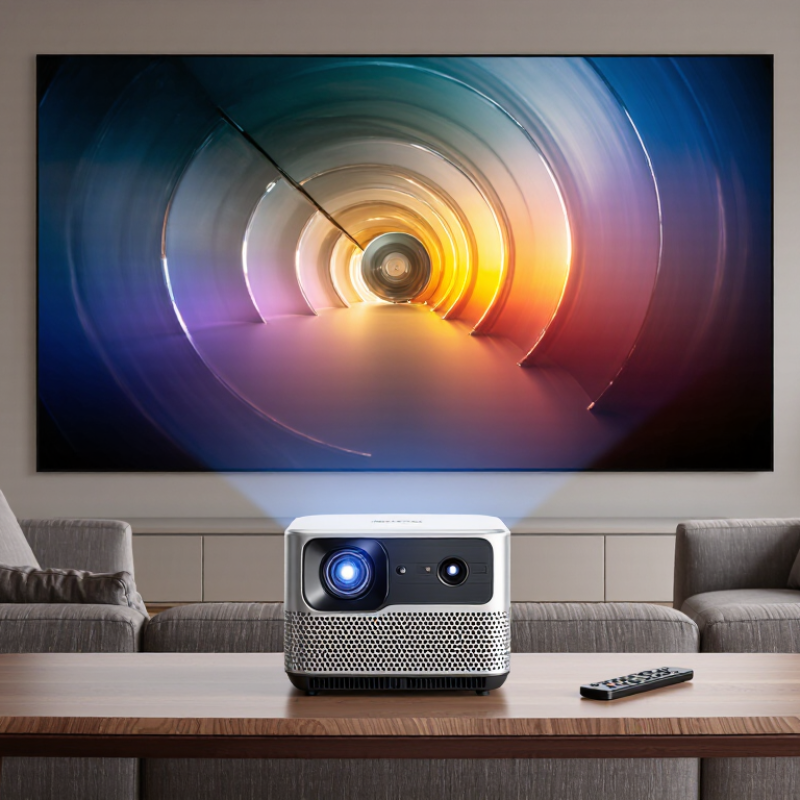
An entertainment projector is a display device designed for movies, games, sports, and casual viewing. It receives video from a streaming device, computer, game console, or storage source. Inside, a light engine illuminates an imaging panel or chip. The lens then enlarges that image onto a wall or screen. The result feels more cinematic than a typical television.
Core features determine everyday performance. Resolution affects visible detail, especially in subtitles and game interfaces. Brightness matters in rooms with windows, but advertised measurements can be difficult to compare. Contrast helps dark scenes appear deeper. A short-throw lens can create a large image from a small distance. That feature suits bedrooms and compact living rooms.
Convenience features also shape the experience. Automatic focus and image correction reduce setup time. Built-in speakers allow quick viewing, although external audio usually sounds fuller. Wireless connections can simplify streaming, while physical ports often provide steadier signals. In my experience, a projector needs careful placement. Even a strong model looks weak on a textured wall. I once trusted automatic correction too much, and the picture lost sharpness near the edges. That small compromise is easy to miss during setup. A dark room, a flat surface, and sensible screen size often matter more than impressive specifications.
An entertainment projector combines light, optics, image processing, and sound in one compact system. Its light source, usually LED or laser, produces the brightness needed for movies, games, and live viewing. LEDs often run quietly and efficiently, while laser systems usually maintain brightness for longer periods. Neither option fixes poor room lighting. Dark walls and covered windows still matter.
The optical engine shapes the image. A DLP, LCD, or LCoS panel controls how light becomes colored pixels. The lens then enlarges that image onto a wall or screen. Focus adjusts sharpness, while zoom changes image size without moving the projector. Lens shift can move the picture vertically or horizontally. Keystone correction reshapes a tilted image, but heavy correction may reduce detail. I have found careful placement better than relying on digital correction.
A built-in processor handles video signals from streaming devices, consoles, computers, or media players. HDMI ports carry picture and sound, while USB ports may support files or power accessories. Some projectors include wireless connections, but signal stability can vary across rooms. The speaker system provides basic audio, and an audio output can connect to stronger external speakers. A cooling fan protects internal parts from heat. It also creates noise. This small compromise is easy to overlook during quiet scenes. A sturdy chassis, adjustable feet, and a clear remote improve daily use, though setup can still feel less simple than expected.
What Is an Entertainment Projector and How Does It Work?
An entertainment projector creates a large image by controlling light. Its light source may use LEDs, lasers, or a lamp. Light passes through an imaging system, such as an LCD panel or a DLP chip. Tiny mirrors or liquid-crystal cells shape each frame. Red, green, and blue light combine to produce color. A lens then enlarges the image onto a wall or screen.
The process happens continuously. The source generates light, the imaging chip builds pixels, and the lens focuses them. Brightness depends on light output, room darkness, screen size, and contrast control. According to Grand View Research’s 2024 projector market analysis, the global projector market was estimated at about 11.9 billion U.S. dollars in 2023. This growth reflects wider use in home entertainment, education, and professional spaces. However, market growth does not guarantee a perfect viewing experience. A projector with high brightness can still look dull on a bright wall. Resolution alone cannot fix poor placement.
Tips: Test the projector at night and during daylight. Measure the throw distance before installation. Keep the lens clean. Use a neutral, flat screen for more accurate color. Also, reduce image size when the picture looks soft. Small adjustments often matter more than advertised specifications.
A useful check is simple: display skin tones, subtitles, and dark scenes. Skin should look natural. Subtitles should remain sharp. Dark areas should retain detail. If they disappear, the room or screen may be limiting performance. That part is easy to overlook.
An entertainment projector creates color by controlling red, green, and blue light channels. The optical system combines these channels and focuses the resulting image onto a screen. The chart shows representative wavelengths for the three primary light channels used in additive color mixing.
An entertainment projector is built for films, games, sports, and casual viewing at home. Unlike office projectors, it usually prioritizes wide images, smooth motion, and simple media access. Its performance depends on more than brightness. In practice, room lighting, wall color, and viewing distance matter greatly. A bright room can weaken contrast. This is easily overlooked.
Content can come from streaming devices, game consoles, laptops, local media players, or phones. HDMI is usually the most dependable connection for high-quality video and stable sound. Wireless casting feels convenient, but network congestion may cause pauses or lower image quality.
I normally test both options before choosing one. A wired connection is less elegant, yet often more reliable. Check the projector’s supported resolution and refresh rate before connecting a console. Some devices accept a signal but display it poorly.
Audio requires equal attention. Built-in speakers are useful for news, children’s programs, or a quick evening movie. They may sound thin during action scenes. A soundbar, powered speakers, or an audio receiver can provide clearer dialogue and stronger bass.
HDMI audio return can reduce cable clutter when supported. Bluetooth headphones offer private listening, although wireless delay sometimes affects lip movement. I once assumed Bluetooth would always sync correctly. It did not. Keep cables accessible, especially when changing between several content sources.
What Is an Entertainment Projector and How Does It Work?
An entertainment projector enlarges video from a streaming device, game console, or computer. It sends light through an imaging chip and lens, creating a picture on a wall or screen. A screen is not mandatory, but a smooth, neutral surface improves detail. The global projector market exceeded 10 billion dollars in 2023, according to Grand View Research’s Projector Market report. Home viewing remains part of a much larger visual entertainment economy. The Motion Picture Association reported 33.9 billion dollars in worldwide theatrical box office revenue in 2023.
Key Factors for Choosing and Using One
Check the room first. Measure the wall, seating distance, and available light. A short-throw model suits a small room, while a standard-throw model needs more space. Brightness matters more than many buyers expect. Look for tested ANSI lumens, not vague brightness claims. Around 1,500 to 2,500 ANSI lumens may suit a dark room; brighter spaces require more. Resolution affects text, subtitles, and game details. Full HD is practical, while 4K offers sharper large images.
Motion performance also matters. Gamers should check input lag and refresh-rate support. For films, contrast and accurate color usually matter more. Leave ventilation space around the projector. Dust buildup can reduce brightness and shorten lamp life. I once judged brightness in a showroom. That was a mistake. At home, ceiling lights changed everything. Calibration can help, but perfect color is difficult on a painted wall. A plain screen often delivers a more consistent result.
| Data Dimension | What It Means | Typical Home-Entertainment Data | Practical Selection and Usage Guidance |
|---|---|---|---|
| Basic Function | An entertainment projector enlarges video or image signals and displays them on a wall or projection screen. | Uses a light source, an imaging system, a lens, and signal-processing electronics. | It is suitable for movies, television, gaming, presentations, and shared viewing when a large image is preferred. |
| Image Formation | The projector converts an electrical video signal into controlled light and color pixels. | Common imaging technologies include LCD, DLP, and LCoS-type systems. | Image quality depends on resolution, contrast, color performance, lens quality, room lighting, and screen surface—not on a single specification alone. |
| Light Source | The light source illuminates the imaging system so the lens can project the picture. | LED and laser sources commonly offer long service lives, while lamp-based sources generally require periodic replacement. | LED and laser models are convenient for frequent use. Lamp-based models may require warm-up, cool-down, and proper ventilation. |
| Native Resolution | The number of physical pixels produced by the projector. | Typical options include 1280 × 720, 1920 × 1080, and 3840 × 2160 output or pixel-shifted 4K-class images. | Full HD is generally suitable for everyday movies and gaming. Higher resolution is useful for large screens, detailed content, and close seating distances. |
| Brightness | The amount of visible light produced by the projector, normally stated in ANSI lumens or ISO lumens. | Approximately 1,000–2,000 lumens suits dark rooms; around 2,000–3,500 lumens is more practical for rooms with moderate ambient light. | Compare measurements made using the same standard. Higher brightness can improve visibility, but room darkness and screen size remain major factors. |
| Contrast | The difference between the darkest black and brightest white the system can reproduce. | Native contrast is generally more useful for judging dark-scene performance than dynamic contrast claims. | For movies, reduce stray light and use a suitable screen. A high contrast figure alone does not guarantee accurate shadow detail. |
| Aspect Ratio | The proportional relationship between image width and height. | 16:9 is the standard format for most modern films, streaming video, and television content. | Choose a projector that natively supports the content format to reduce unwanted borders or scaling. |
| Throw Ratio | The relationship between the distance from the lens to the screen and the image width. | Standard-throw models often use approximately 1.2:1 to 2.0:1; short-throw models are commonly below about 1.0:1. | Measure the available installation distance before buying. A short-throw design is helpful in smaller rooms, while an ultra-short-throw design can sit very close to the wall. |
| Screen Size | The diagonal measurement of the projected image. | Home-use images commonly range from about 80 to 150 inches diagonally, depending on room size and brightness. | Larger images need sufficient brightness and viewing distance. Avoid choosing a screen size that makes viewers sit uncomfortably close. |
| Keystone Correction | Digital adjustment that compensates for a trapezoidal image caused by angled placement. | Vertical and sometimes horizontal correction may be available. | Use physical alignment and lens shift when possible. Heavy digital correction can reduce effective resolution and image sharpness. |
| Lens Shift | Mechanical movement of the lens that changes image position without tilting the projector. | Available adjustment varies significantly by model; some compact projectors have no lens shift. | Lens shift generally preserves more image quality than digital keystone correction and is valuable for permanent installations. |
| Refresh Rate | How frequently the displayed image is updated. | 24 Hz is common for film content; 50 or 60 Hz is common for television and console gaming; some models support higher rates at lower resolutions. | Match the projector and source settings to reduce judder, flicker, or unnecessary processing. |
| Input Lag | The delay between an action from a controller or computer and the resulting image change. | Gaming-oriented projectors may achieve below 30 milliseconds in a dedicated low-latency mode, while standard modes can be higher. | For fast games, check input lag at the intended resolution and refresh rate. Turn off unnecessary image-processing features when low latency matters. |
| Connectivity | The ports and wireless options used to receive video, audio, and control signals. | HDMI is the primary video connection; USB, optical audio, Bluetooth, Wi-Fi, and network control may also be available. | Confirm compatibility with the streaming device, game console, computer, sound system, and cable length before installation. |
| Audio Output | The built-in or external system used to reproduce sound. | Built-in speakers are convenient, but their power and soundstage are usually limited compared with separate speakers or a soundbar. | Use an external audio system for films, music, and large-room viewing. Check whether audio delay adjustment is available. |
| Room Lighting | Ambient light that competes with the projected image. | A dark room provides the best black levels and color depth; daylight and overhead lighting reduce perceived contrast. | Use curtains, dimmable lighting, and a suitable screen. Increasing brightness cannot fully compensate for strong light falling directly on the screen. |
| Projection Surface | The wall or screen that reflects the projected image to viewers. | A neutral, smooth, matte-white surface is a common general-purpose choice. | A dedicated screen can improve uniformity and viewing consistency. The screen gain should match the projector brightness and seating arrangement. |
| Ventilation | The airflow required to remove heat generated during operation. | Many projectors use intake and exhaust vents and require clearance around the chassis. | Do not block vents or place the unit on soft surfaces. Maintain the clearance specified in the user manual to prevent overheating. |
| Maintenance | Routine care that helps preserve brightness, cooling performance, and image quality. | Typical tasks include cleaning accessible filters or vents, keeping the lens dust-free, and updating software when applicable. | Power the projector down using its normal procedure, allow adequate cooling, and follow the manufacturer’s cleaning instructions. |
| Best Room Match | The environment in which the projector can perform effectively. | Dark rooms favor cinematic contrast; moderately lit rooms require more brightness and better light control. | Evaluate room dimensions, seating distance, screen position, ambient light, sound requirements, and available power before selecting a model. |
| Recommended Setup Priority | The order in which the major purchase and installation factors should be evaluated. | 1. Room and screen size; 2. Throw distance; 3. Brightness; 4. Native resolution; 5. Connectivity; 6. Gaming and audio features. | Starting with the room prevents buying a projector that cannot produce the required image size, brightness, placement flexibility, or connection compatibility. |